Set a Content snippet’s run location to Shortcode and it stops running
on its own. Instead it runs wherever you place its shortcode: in a post, a page, a widget, a template
via do_shortcode(), or another snippet.
Getting the shortcode
Save the snippet once, and the editor shows the shortcode below the run location selector, with a copy button.
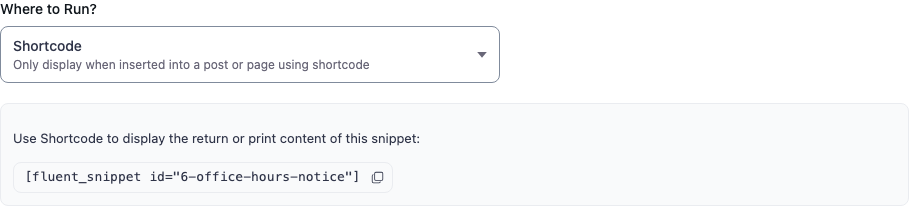
The id is the snippet’s filename without the .php extension:
[fluent_snippet id="6-office-hours-notice"]It is derived from the snippet name at creation time and does not change when you rename the snippet afterwards, so an existing shortcode keeps working after a rename.
Output: echo or return
A shortcode snippet can produce its output either way.
Print it. Anything the snippet echoes is captured and returned as the shortcode’s output. This is the natural style for a snippet that is mostly markup:
<p class="notice">
    We answer support requests Monday to Friday, 9am to 5pm.
</p>
Return it. If the snippet prints nothing, its return value is used instead, provided it is a string or a number:
<?php
return 'Copyright ' . esc_html( gmdate( 'Y' ) );
If a snippet neither prints anything nor returns a string or number, the shortcode renders an error
message. That message is only ever shown to users who can manage_options; everyone else sees
nothing at all, so a broken shortcode never leaks a message to visitors.
Passing attributes
Attributes you add to the shortcode are available inside the snippet as $atts:
[fluent_snippet id="6-office-hours-notice" tone="brief" show_phone="yes"]<?php
$tone = isset( $atts['tone'] ) ? $atts['tone'] : 'full';
?>
<p class="notice notice--<?php echo esc_attr( $tone ); ?>">
<?php if ( 'brief' === $tone ) : ?>
Support: Mon–Fri, 9–5.
<?php else : ?>
We answer support requests Monday to Friday, 9am to 5pm.
<?php endif; ?>
<?php if ( ! empty( $atts['show_phone'] ) && 'yes' === $atts['show_phone'] ) : ?>
Call us on 555 0100.
<?php endif; ?>
</p>Your own attributes are passed through untouched alongside id. Always give them a default and
validate them, as above; a shortcode in a post is user input.
The enclosed content, if the shortcode is used as [fluent_snippet id="…"]…[/fluent_snippet], is
available as $content.
When a shortcode renders nothing
Several conditions have to hold for a shortcode snippet to run. If any fails, an admin sees a short explanation in place of the output and everyone else sees an empty string:
| Message | Cause |
|---|---|
| Snippets are disabled | Safe Mode is on |
| Snippet has an error | The snippet was quarantined after a fatal error |
| Snippet type is not PHP Content | The id points at a Functions, Styles or Scripts snippet |
| Snippet run at is not shortcode | The snippet exists but its run location is not Shortcode |
| Snippet status is not published | The snippet is still a draft |
| Snippet condition is not valid | Its conditional logic did not match this request |
| Return Data is not valid | It printed nothing and returned something that is not a string or number |
That last one is the most common when starting out. Check whether your snippet actually outputs anything.
Conditional logic still applies
A shortcode snippet’s conditions are evaluated when the shortcode renders. So you can place the same shortcode in a shared template and let the conditions decide whether it shows anything, rather than duplicating the block per page.
Using a shortcode outside post content
In a theme template or another snippet:
echo do_shortcode( '[fluent_snippet id="6-office-hours-notice"]' );In a block editor page, use a Shortcode block. In a widget area, the Shortcode widget.