Custom code breaks sites. FluentSnippets is built on the assumption that one of your snippets will eventually throw a fatal error, and that when it does the rest of the site should stay up.
Validation before the file is written
The first line of defence is that most bad PHP never reaches disk. When you save a Functions snippet, the code is:
- Parsed, to catch syntax errors and to spot functions, classes or interfaces you are redeclaring.
- Evaluated once, to surface runtime errors a parse cannot see.
If either step fails you get the error in the editor and nothing is saved. Content, Styles and
Scripts snippets get lighter checks: a wrapping <style> or <script> tag is refused, and a
Functions snippet starting with its own <?php is refused.
The validator cannot know about functions defined by your theme or another plugin, so a redeclaration against those still gets through. See Redeclaration errors.
Automatic deactivation
If a published snippet causes a fatal error at runtime, FluentSnippets records which snippet it was and stops loading it. Every other snippet keeps running, and so does the site.
The snippet then appears in the list as Paused, with the error message in place of its description, on a highlighted row so you cannot miss it:
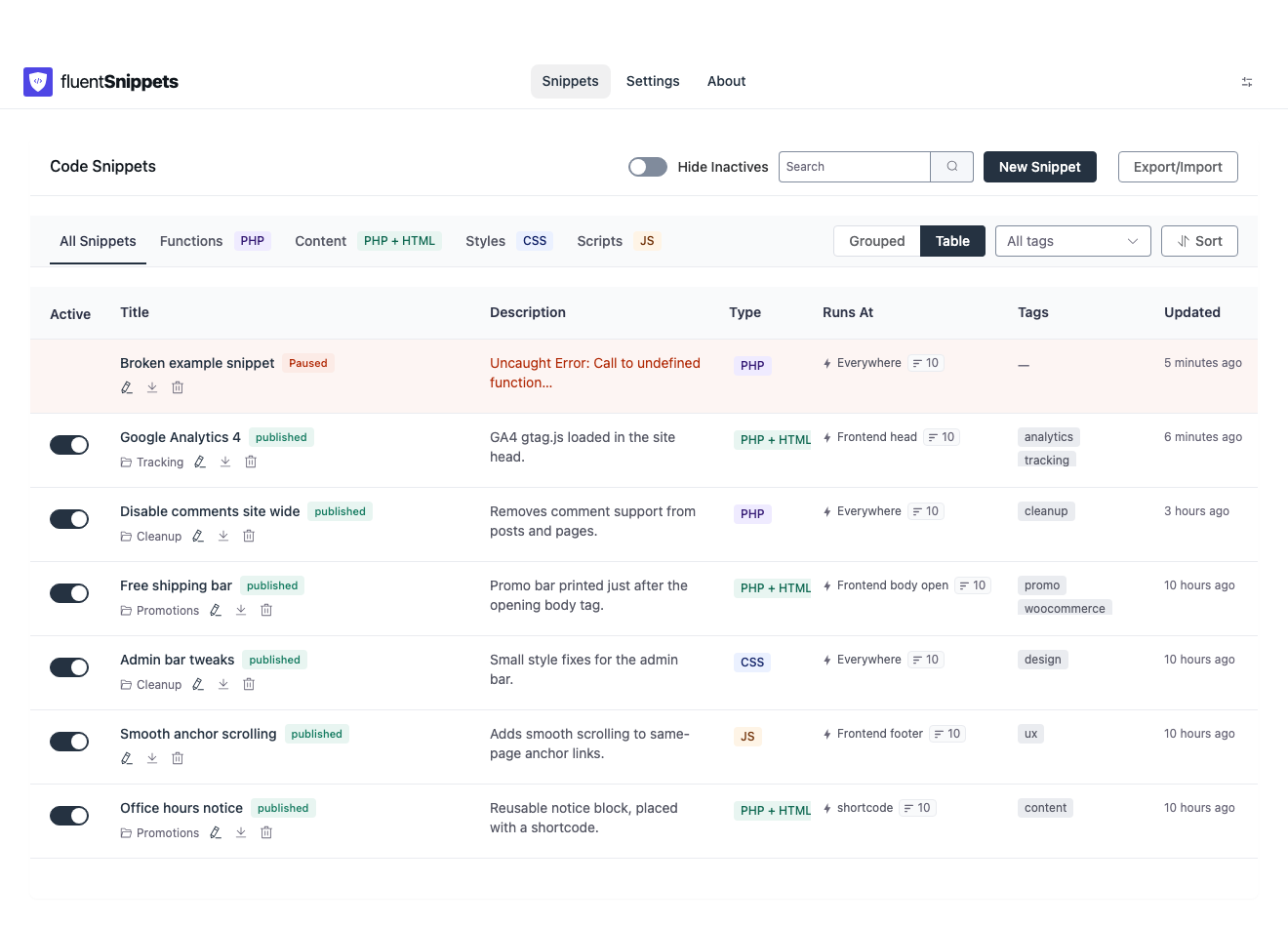
The fatal error types that trigger this are E_ERROR, E_PARSE, E_CORE_ERROR, E_COMPILE_ERROR
and E_USER_ERROR. Warnings, notices and deprecations do not pause a snippet. They are noisy but
they do not take a site down, and quarantining on them would disable working code.
How the right snippet gets blamed
The obvious approach, reading the file path from the error, only works when the fatal happens inside
the snippet itself. The common real-world case is different: your snippet calls a WordPress or plugin
function, and that function fatals. The error then points at wp-includes/…, and a naive handler
blames nothing.
FluentSnippets tracks which snippet is currently executing. A fatal error does not unwind the call stack, so whichever snippet is still marked as running when the request dies is the one that led there. That is the snippet it pauses.
Errors are only ever attributed to a snippet the index already knows about, so an unrelated fatal elsewhere on the site cannot pause one of your snippets.
Turning it off
Settings → Deactivate a snippet that causes a fatal error is on by default.
You can turn it off, and the settings screen warns you in red when you do. With it off, a snippet that fatals keeps fataling on every request, and the site stays broken until you fix it or use Safe Mode. The only real reason to turn it off is a debugging session where you want the error to keep reproducing.
Bringing a paused snippet back
- Open the paused snippet from the list.
- Read the recorded error at the top of the row or in the table view.
- Fix the code.
- Save. Saving clears the error and the snippet returns to its previous status.
While you are on the editor screen for a snippet, FluentSnippets skips running that one snippet for the save request. So a snippet that breaks the admin cannot stop you from opening and fixing it.
Getting the error message
The recorded message is the first line of the PHP error, with paths trimmed:
- When the fatal was inside the snippet, the file path is replaced with the word
SNIPPET, so you get something likeUncaught Error: Call to undefined function acme_helper() in SNIPPET:12. The line number is the line in the file, which includes the header block, so it is a few lines higher than the line in the editor. - When the fatal was downstream, the message is prefixed with
Fatal error while this snippet was running:and the path is shown relative to the WordPress root, so you can see which core or plugin file actually blew up.
When automatic deactivation cannot help
Two cases it does not cover:
- A snippet that does not fatal but still locks you out. An infinite redirect, or a snippet that removes your own capabilities, produces no PHP error at all. There is nothing to detect.
- Another plugin catching the error first. If something on the site installs a global exception handler that swallows uncaught errors, PHP never reports a fatal and FluentSnippets never sees one.
Safe Mode exists for both. It is the answer to “I am locked out and I do not know which snippet did it”.
Write PHP snippets on staging where you can. When you cannot, save the snippet as a draft first, read it once more, then publish. The draft is written and validated without running.