A Styles snippet holds plain CSS. It replaces the Additional CSS box in the Customizer, a theme’s custom-CSS field, or a small stylesheet you would otherwise enqueue by hand, and it survives theme changes.
Writing one
Write the rules only. FluentSnippets wraps the output in a <style> element for you, and refuses to
save a snippet whose code starts with its own <style> tag, because that tag would be printed as
literal text.
#wpadminbar {
    box-shadow: none;
}

.entry-title {
    letter-spacing: -0.02em;
}
Mentioning a tag inside a string or a comment is fine. Only a wrapping tag at the very start is rejected.
Run locations
| Location | Where the CSS applies |
|---|---|
| Frontend | Public pages only |
| Backend | /wp-admin/ only |
| Both Backend and Frontend | Everywhere |
Two extra options
Styles snippets have two checkboxes the other types do not.
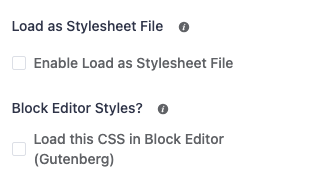
Load as Stylesheet File
By default the CSS is printed inline in a <style> block on every matching page. Tick this and
FluentSnippets writes the rules to a real .css file in
wp-content/fluent-snippet-storage/cached/ and enqueues it with wp_enqueue_style() instead.
Which one you want depends on the snippet:
- Inline avoids an extra request. Best for a handful of rules, and for anything that must apply before first paint.
- As a file lets the browser and any CDN cache it across page loads. Better for a large block of CSS used site-wide.
The enqueued file is versioned with the snippet’s last-updated timestamp, so editing the snippet busts the cache automatically. Turning the option back off deletes the cached file.
Block Editor Styles
Tick Load this CSS in Block Editor (Gutenberg) and the same rules are also injected into the block editor canvas, so what you see while writing matches the front end.
This is independent of the run location: a snippet can be set to Frontend and still be loaded in the
editor. It is added through the block_editor_settings_all filter as plugin-sourced styles.
Block editor styles apply inside the editor canvas, where your theme's front-end wrapper classes may not exist. If a rule works on the site but not in the editor, it is usually because the selector depends on a wrapper the editor does not render.
Conditional logic
Styles snippets support conditional logic like any other type, so you can load a block of CSS only on one post type, one URL, or for one user role. That is generally better than shipping every rule everywhere and scoping with selectors.
Note that conditions are evaluated when the CSS is printed. For a front-end snippet that is during
wp_head, by which point WordPress knows what page it is serving, so page and post conditions work
as expected.
Examples
Hide the admin bar’s WordPress logo, Backend
#wp-admin-bar-wp-logo {
    display: none;
}
Brand the login page
Set the run location to Backend. The login screen is not /wp-admin/, so for
wp-login.php you need a Functions snippet hooked to login_head
instead:
add_action( 'login_head', function () {
    echo '<style>#login h1 a { background-image: url(/logo.svg); }</style>';
} );
Utility classes used across the site, Both, as a file
.u-hidden { display: none !important; }
.u-center { margin-inline: auto; }
.u-stack > * + * { margin-top: 1rem; }
Tick Load as Stylesheet File for this one. It is used on every page and benefits from being cached.