What happens when a snippet takes your site down
Validation before save, automatic quarantine at runtime, and the URL that gets you back in when neither one helped.
Custom code breaks sites. Not usually, not often, but eventually — a function name that already exists, a plugin that changed its API, a copy-paste from a Stack Overflow answer written for PHP 5.
FluentSnippets is built on the assumption that this will happen to you. Three layers deal with it, and it is worth knowing all three before you need them.
Layer 1: most bad PHP never reaches disk
When you save a Functions snippet, the code is checked before the file is written:
- Parsed, to catch syntax errors and to spot functions, classes or interfaces you are redeclaring.
- Evaluated once, to surface runtime errors a parse cannot see.
If either step fails, you get the error in the editor and nothing is saved. Content, Styles and
Scripts snippets get lighter checks — a wrapping <style> or <script> tag is refused, and a
Functions snippet starting with its own <?php is refused — because those are the mistakes that
produce broken output rather than fatal errors.
The validator cannot know about functions defined by your theme or another plugin, so a redeclaration against those still gets through. Which is what the next layer is for.
Save a risky snippet as a draft first. Draft snippets are written and validated but never run, so you get the parse check without exposing the front end to the result.
Layer 2: a snippet that fatals gets quarantined
If a published snippet causes a fatal error at runtime, FluentSnippets records which one it was and stops loading it. Every other snippet keeps running. So does the site.
The snippet then shows up in the list as Paused, with the message that caused it where its description would be, highlighted so you cannot miss it:
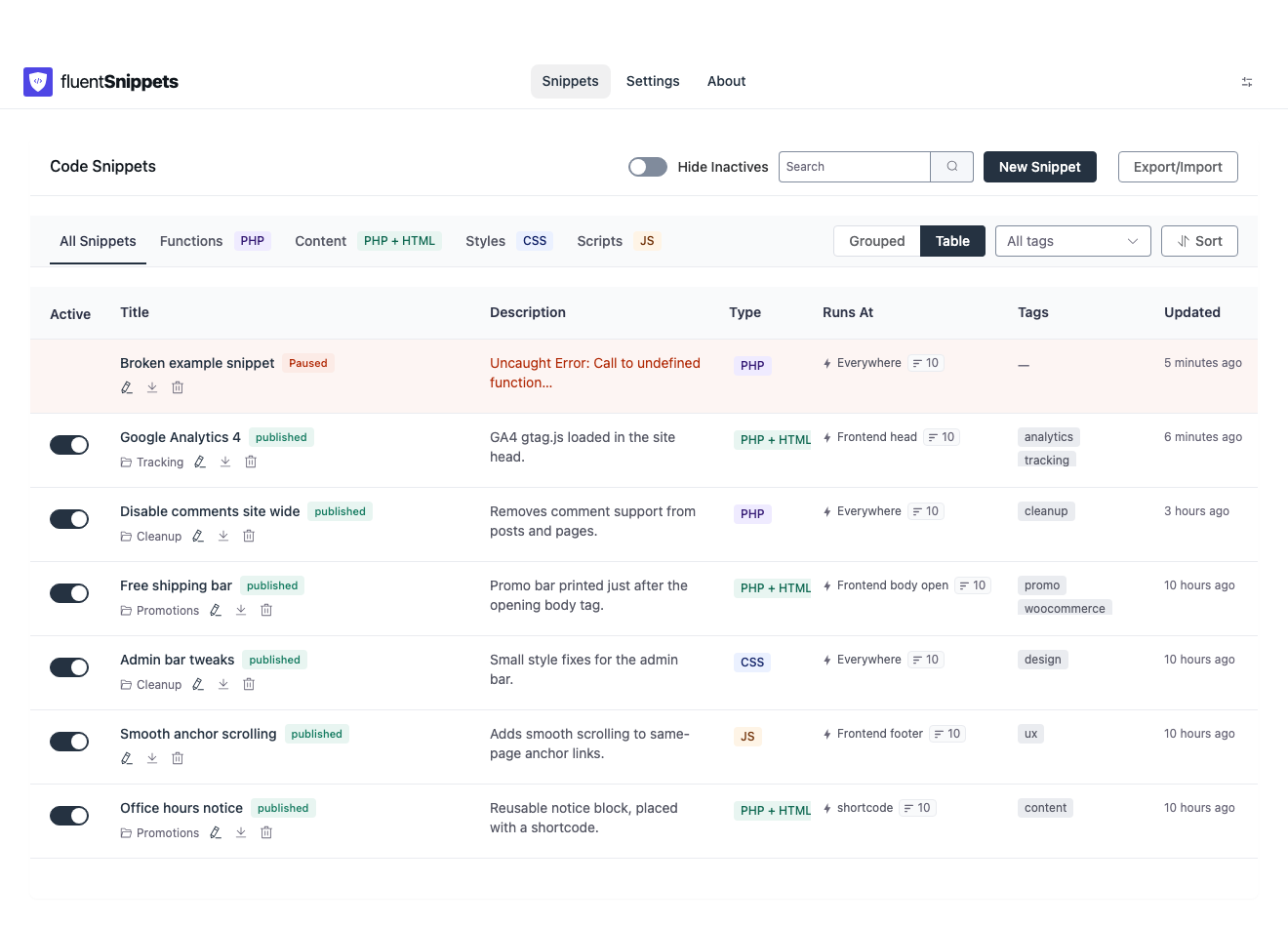
Only real fatals trigger this: E_ERROR, E_PARSE, E_CORE_ERROR, E_COMPILE_ERROR and
E_USER_ERROR. Warnings, notices and deprecations do not. They are noisy, but they do not take a
site down, and quarantining on them would disable working code.
Blaming the right snippet
The obvious implementation — read the file path out of the error — only works when the fatal happens
inside the snippet. The common real-world case is different: your snippet calls a WordPress or
plugin function, and that function fatals. The error points at wp-includes/…, and a naive handler
blames nothing at all.
So FluentSnippets tracks which snippet is currently executing. A fatal error does not unwind the call stack, which means whichever snippet is still marked as running when the request dies is the one that led there. That is the one it pauses.
Errors are only ever attributed to snippets the index already knows about, so an unrelated fatal elsewhere on the site cannot pause your code by accident.
Reading the message
The recorded message is the first line of the PHP error, with paths trimmed:
- Fatal inside the snippet — the path is replaced with the word
SNIPPET, giving you something likeUncaught Error: Call to undefined function acme_helper() in SNIPPET:12. That line number counts from the top of the file, which includes the header block, so it is a few lines higher than the line you see in the editor. - Fatal downstream — the message is prefixed with
Fatal error while this snippet was running:and the path is shown relative to the WordPress root, so you can see which core or plugin file actually blew up.
To bring it back: open it, fix the code, save. Saving clears the error and restores the previous status. And while you are on a snippet’s editor screen, FluentSnippets skips running that one snippet for the save request — so a snippet that breaks the admin cannot stop you from opening and fixing it.
Layer 3: the kill switch
Two situations the quarantine cannot help with:
- A snippet that does not fatal but still locks you out. An infinite redirect, or code that removes your own capabilities, produces no PHP error at all. There is nothing to detect.
- Another plugin catching the error first. If something installs a global exception handler that swallows uncaught errors, PHP never reports a fatal and FluentSnippets never sees one.
For both, there is Safe Mode. Settings → Safe Mode shows a URL unique to your site:
https://example.com/index.php?fluent_snippets=1&snippet_secret=<your-secret-key>Visiting it disables every snippet immediately and redirects you to the admin. It works without a login, which is the entire point — it has to work when the admin is unreachable.
If you cannot reach the site over HTTP at all but do have file access, the same thing from
wp-config.php:
define( 'FLUENT_SNIPPETS_SAFE_MODE', true );Safe Mode is a pause, not a lockdown. The admin screens keep working: you can read, edit, save and delete snippets while it is on. They just do not execute. Everything you need to fix the problem is still in front of you.
That secret is a kill switch that needs no login. Treat it like a password — never paste it into a public issue, a screenshot or a support forum. And copy it somewhere you can reach without your site, because fetching it from the settings screen is no help when the settings screen is what is broken.
The recovery checklist
Print this, or put it in the project README:
- Visit the Safe Mode URL. The site should come back.
- Open FluentSnippets and look for a row marked Paused with an
ERRORbadge. If there is one, that was the culprit and it is already off. - If nothing is paused, set the snippets you changed most recently to draft. Sort by Updated At descending in table view to find them.
- Turn Safe Mode off.
- Re-publish snippets one at a time, checking the site between each.
Five steps, no database client, no SFTP. The full detail is in Error handling and Safe Mode.